
Product Design
Full Case Study
2025
Demystifying the NYC Housing Lottery
Reducing anxiety for low-income applicants through transparent status tracking and proactive guidance
Timeline
August – November 2025
Team
Solo Project
Role
Product Designer
LONG STORY SHORT
I redesigned the NYC Housing Connect applicant experience to replace "black box" anxiety with transparency, trust, and proactive guidance.
I undertook this project as a Product Designer to address the severe emotional toll of the NYC affordable housing application process. Driven by community research indicating high levels of user anxiety, I led the end-to-end research and design of a new applicant dashboard. My goal was to shift the platform from a passive administrative tool into an active, empathetic guide that supports vulnerable applicants through months of uncertainty.
01
Design
Established the "Clarity" visual system using calming color psychology to lower cognitive load. Delivered high-fidelity interfaces for the "Active Wait" tracker and the pre-emptive "Document Vault" to empower users.
02
Research
Conducted digital ethnography on community forums (Reddit/City-Data) to isolate the root causes of "Status Anxiety." Synthesized findings into a "Stress Case" persona (Sarah) to ensure the solution worked for the most vulnerable users.
03
Execution
Overhauled the content strategy to shift the system's voice from bureaucratic to supportive. Developed the "Permission to Relax" notification logic, designed to measurably reduce obsessive portal-checking behaviors.
How might we design a status tracker that contextualizes the "waiting period," so applicants understand exactly where they stand without needing to obsessively check for updates?
MARKET RESEARCH
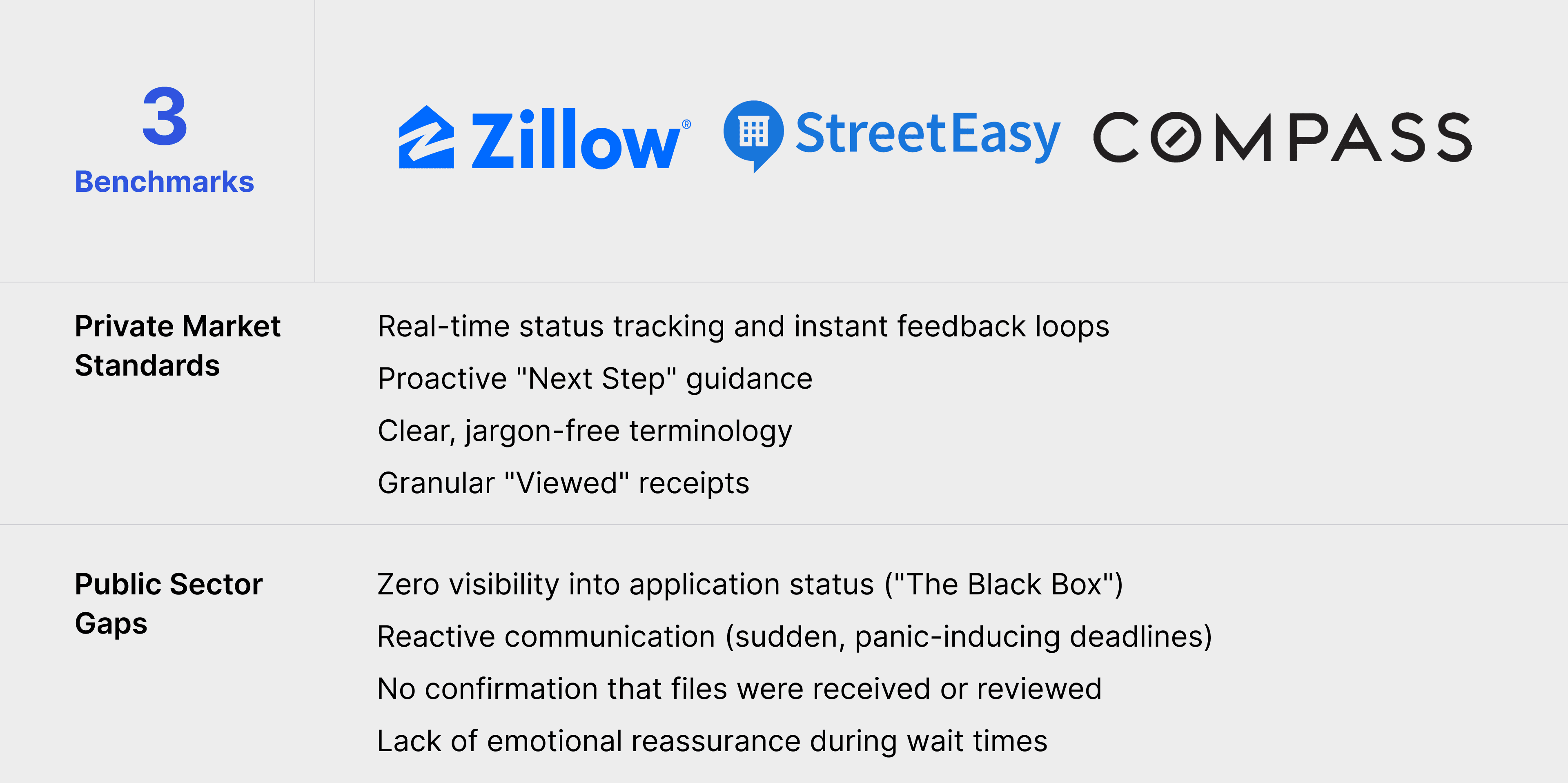
Applicants expect the clarity of StreetEasy, but face the opacity of a government bureau.
I analyzed the private market leaders (StreetEasy, Zillow) to understand the baseline expectations of NYC renters. While these tools prioritize speed and transparency, the current Housing Connect system operates on a "black box" model, creating a massive experience gap.
Opportunity: Bridge the trust gap by applying private-sector transparency standards to the public sector application process.
COMMUNITY RESEARCH & DIGITAL ETHNOGRAPHY
To understand the emotional toll of the waitlist, I analyzed 50+ threads across Reddit and City-Data forums.
Since direct access to active government applicants is restricted, I turned to the digital communities where they speak freely. Analyzing years of post history revealed that the "silence" from the city wasn't just annoying. It was triggering obsessive behaviors and deep distrust in the system.
"The Void" Creates Anxiety
"I check the portal 5 times a day even though I know nothing changed. The silence makes me feel like they lost my file."
Deadlines Feel Punitive
"After waiting 6 months, they gave me 48 hours to find my signed tax returns and notarized letters. I'm at work. How am I supposed to do this?"
Opacity Breeds Suspicion
"My log number is #450. Is that good? Bad? I have no idea if I should keep hoping or just move on."
Documentation Ambiguity
"The list just says 'Proof of Income.' I don't know if my pay stubs are enough or if I'll get rejected for a mistake."
OPPORTUNITIES
I defined four key feature areas to shift the experience from "Passive Waiting" to "Active Preparation."
Based on the "Stress Case" persona (Sarah), I identified opportunities to balance government compliance with human empathy. This gives users a sense of control during the long waiting periods.

Live Status Timeline
A granular, chronological view of the application process. It replaces the static "Waiting" status with "Active" steps, such as "Log # Assigned" or "In Queue," to prove the system is working.
Pre-emptive Uploads
A secure digital wallet that allows users to upload, verify, and store critical documents months before the deadline hits. This eliminates the "48-hour panic."
Proactive Notifications
A system that explicitly tells users: "You do not need to check this page. We will text you." This permission to relax measurably reduces anxiety and obsessive checking.
In-Line Guidance
Replacing "Legalese" with plain language. Tooltips and "What this means" accordions explain complex terms directly in the interface
IDEATION & PROCESS
I explored four distinct interaction models to find the right balance between "Data Density" and "User Reassurance."
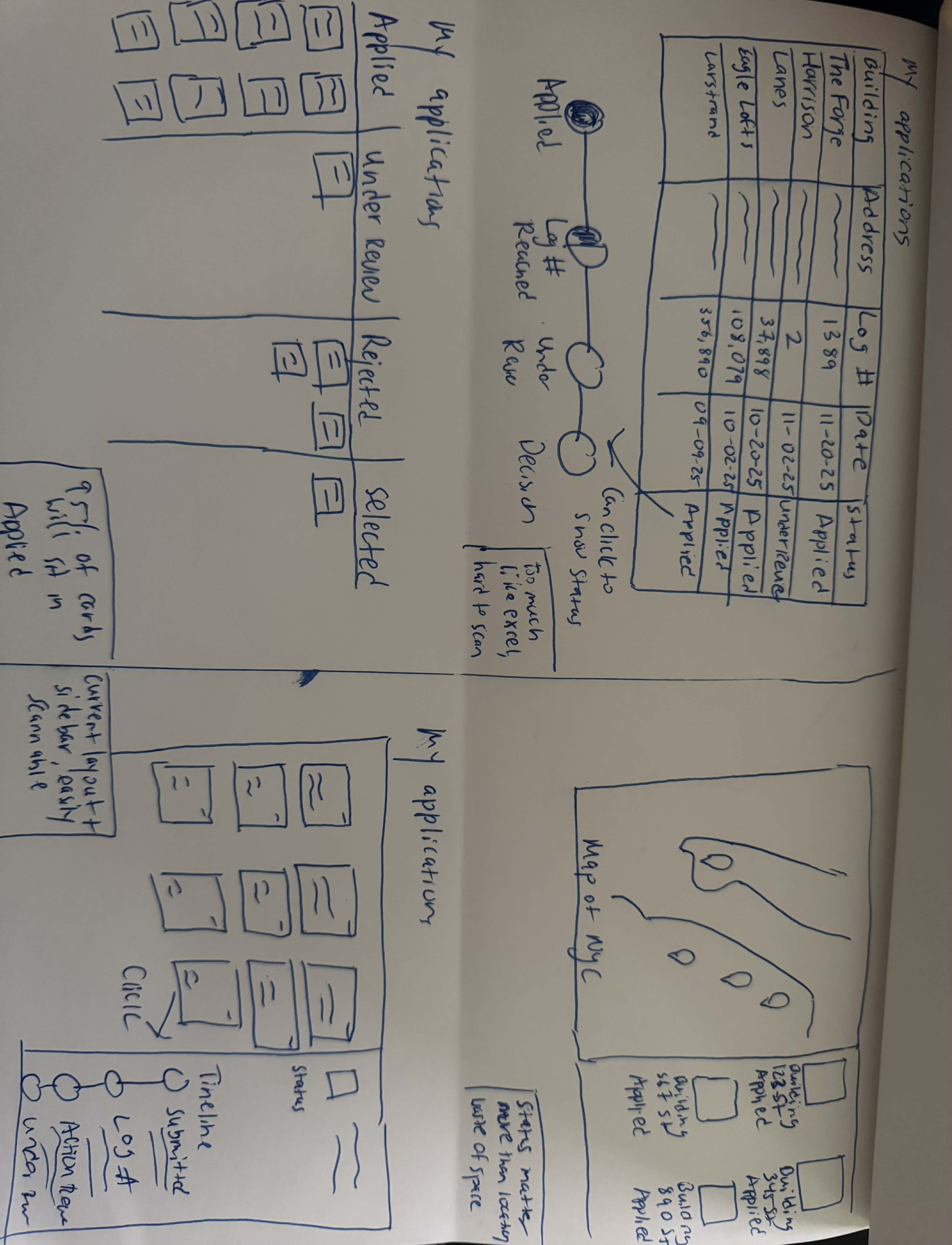
Users often have 20+ active applications spanning several years. I used rapid sketching (Crazy 4s) to test different ways to organize this volume, looking for a layout that prioritized status recognition without overwhelming the user with data.
01
The Data List
Too dense. A spreadsheet-style view is efficient for admins, but stressful for applicants. It forces users to read small text to find updates.
02
The Map View
Wrong priority. While common in real estate (Zillow), a map view emphasizes Location. Applicants care about Time/Status, not where the building is.
03
The Kanban Board
Poor scaling. Since 90% of housing applications sit in the "Applied" column for years, the board would be visually unbalanced.
04
Visual Cards + Sidebar
The "Master-Detail" pattern. Visual cards allow users to recognize buildings instantly by image. The "Sidebar" interaction lets them drill into details without losing context.
THE SOLUTION
A complete ecosystem redesign to replace "Black Box" anxiety with "Glass House" transparency.
From "Passive Browsing" to "Action-First"
Replacing read-only status reports with a prioritized workspace.
After
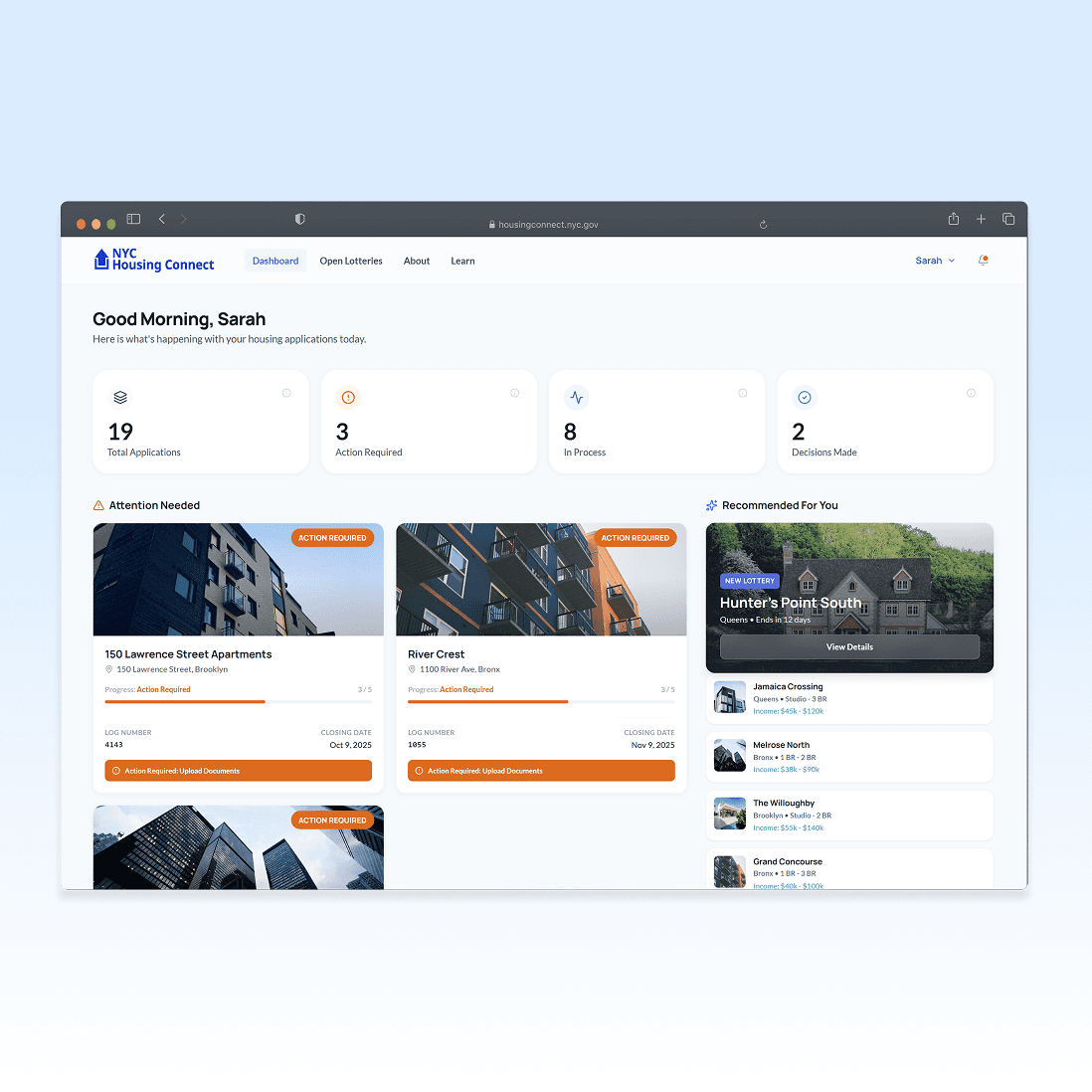
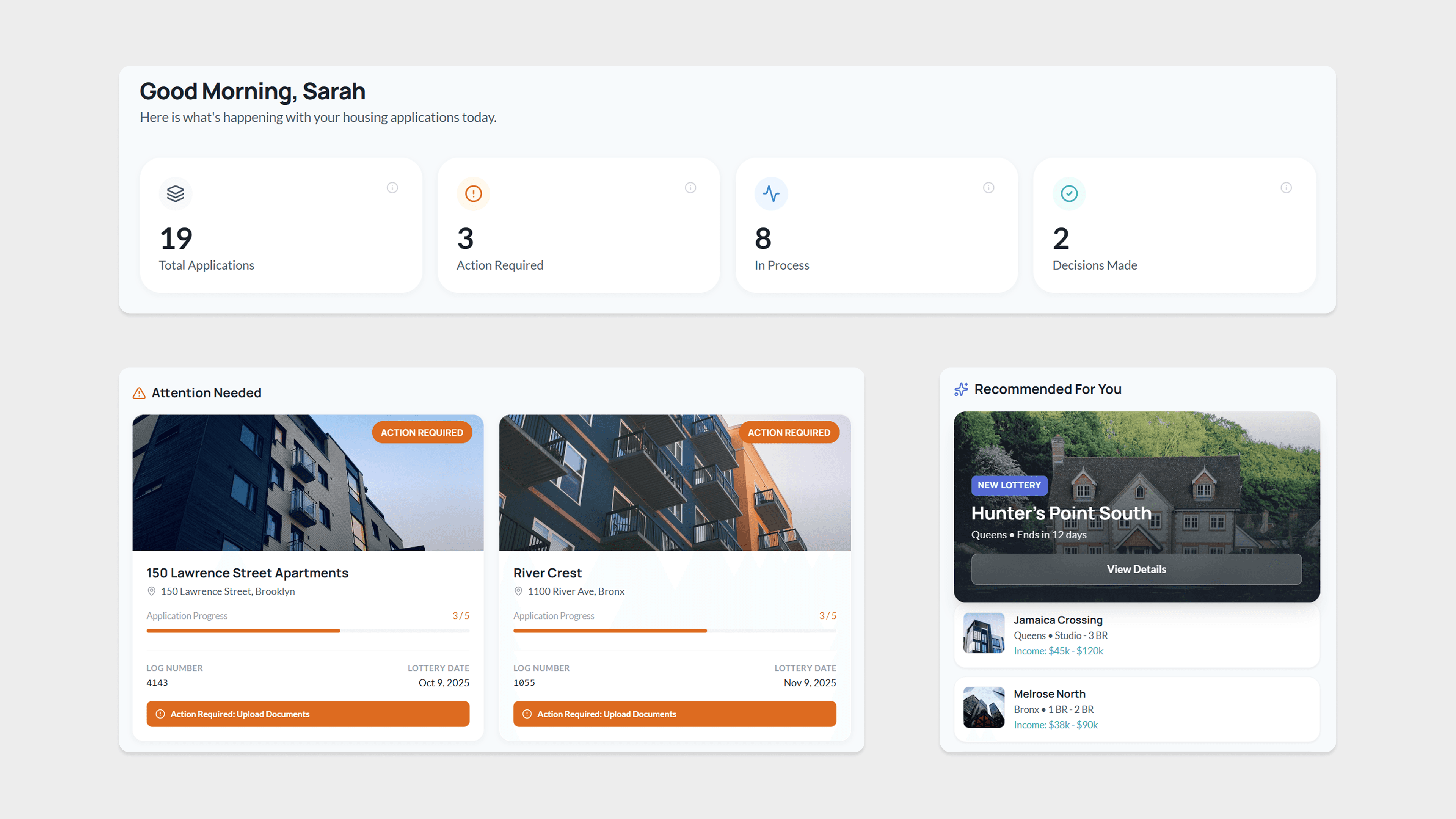
An Action-First Workspace. The top-level counters immediately quantify the workload, while the "Attention Needed" zone pulls urgent applications front-and-center so users never miss a deadline.
Before
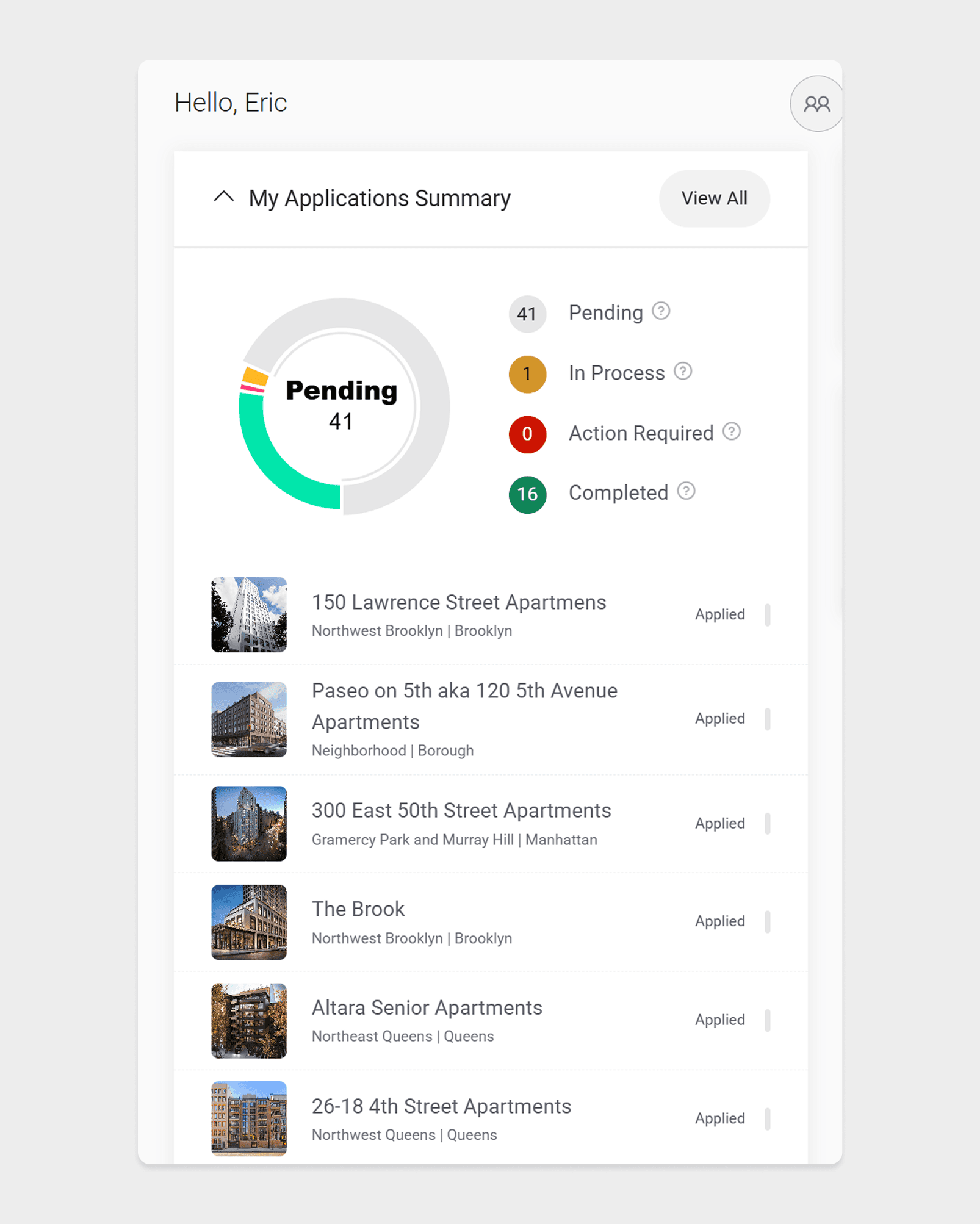
The legacy dashboard acts as a passive directory. Users have to hunt through dozens of listings just to find tasks, causing critical deadlines to slip.
From "Binary Status" to "Progress Indicators"
Replacing a wall of text with a scannable, visual tracking system.
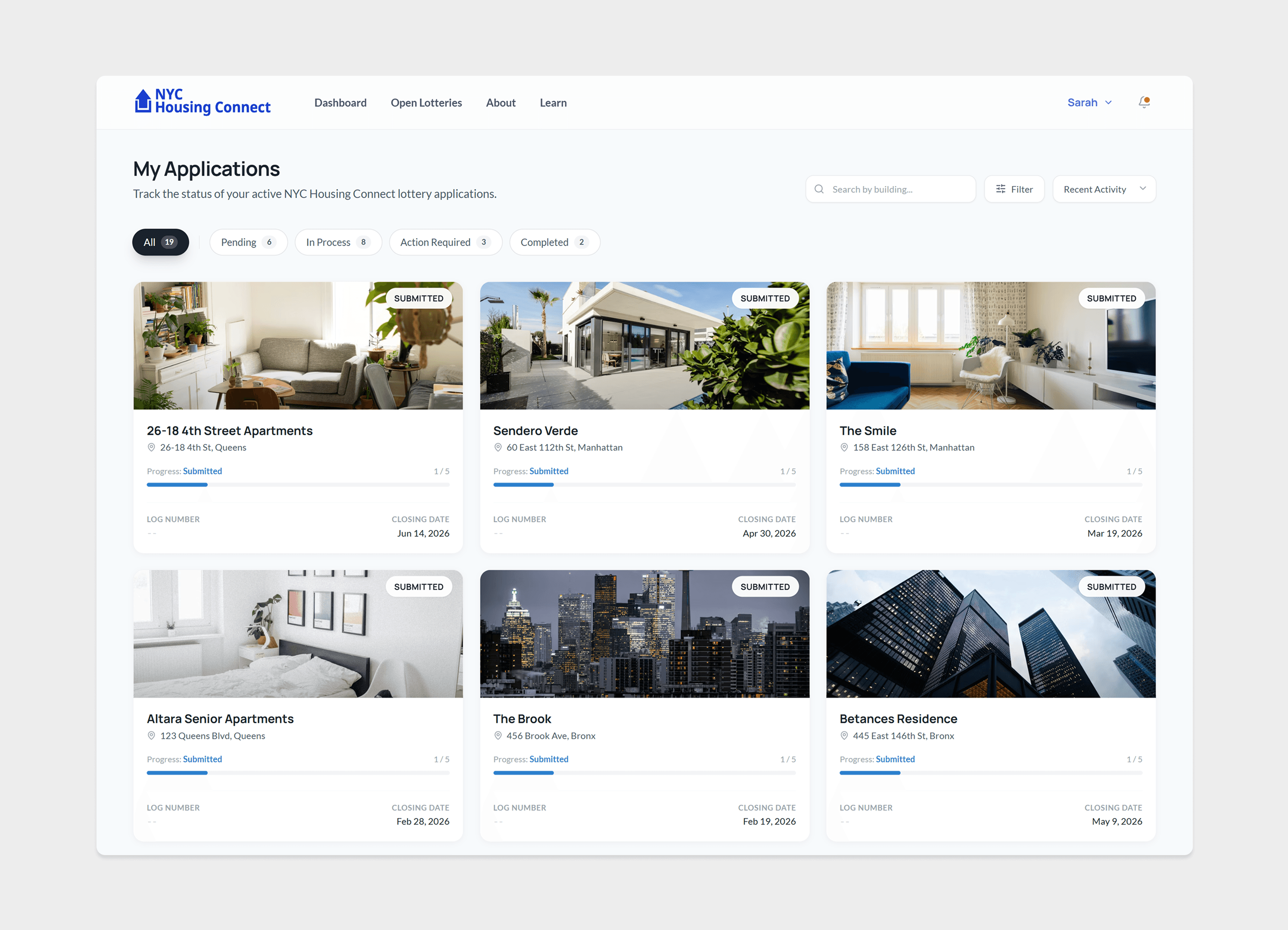
After
I gave each card a 5-step progress bar so users can instantly see where they stand without clicking anything. It turns a static list into a journey, and the bright Orange buttons make sure urgent tasks never get ignored.
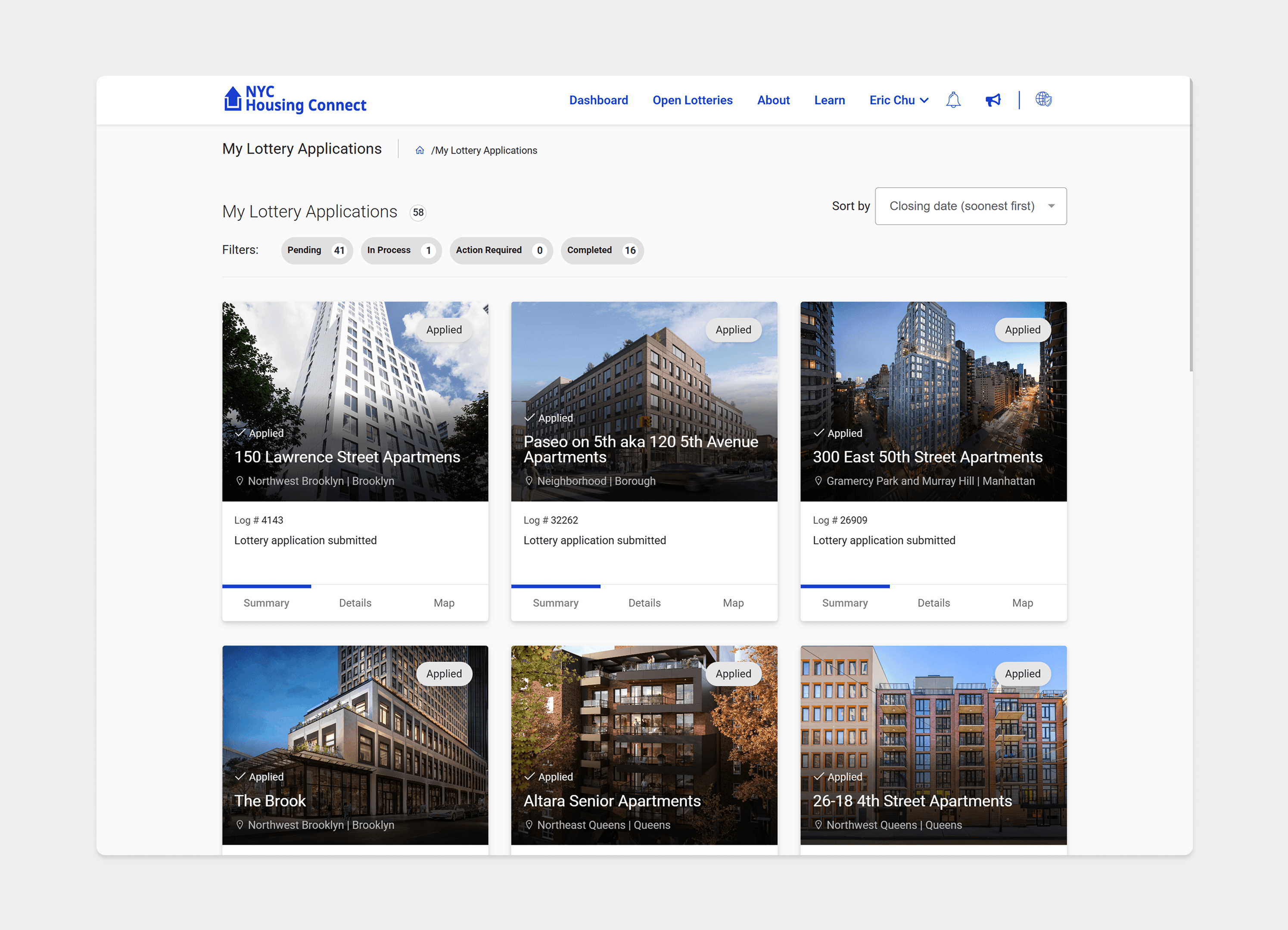
Before
The current site is just a list of identical text. Every application says "Applied," whether you applied yesterday or two years ago. Users have to click into every single one just to check if anything changed.
From "Static Tabs" to "Active Timelines"
Replacing fragmented navigation with a sidebar that keeps you in flow.
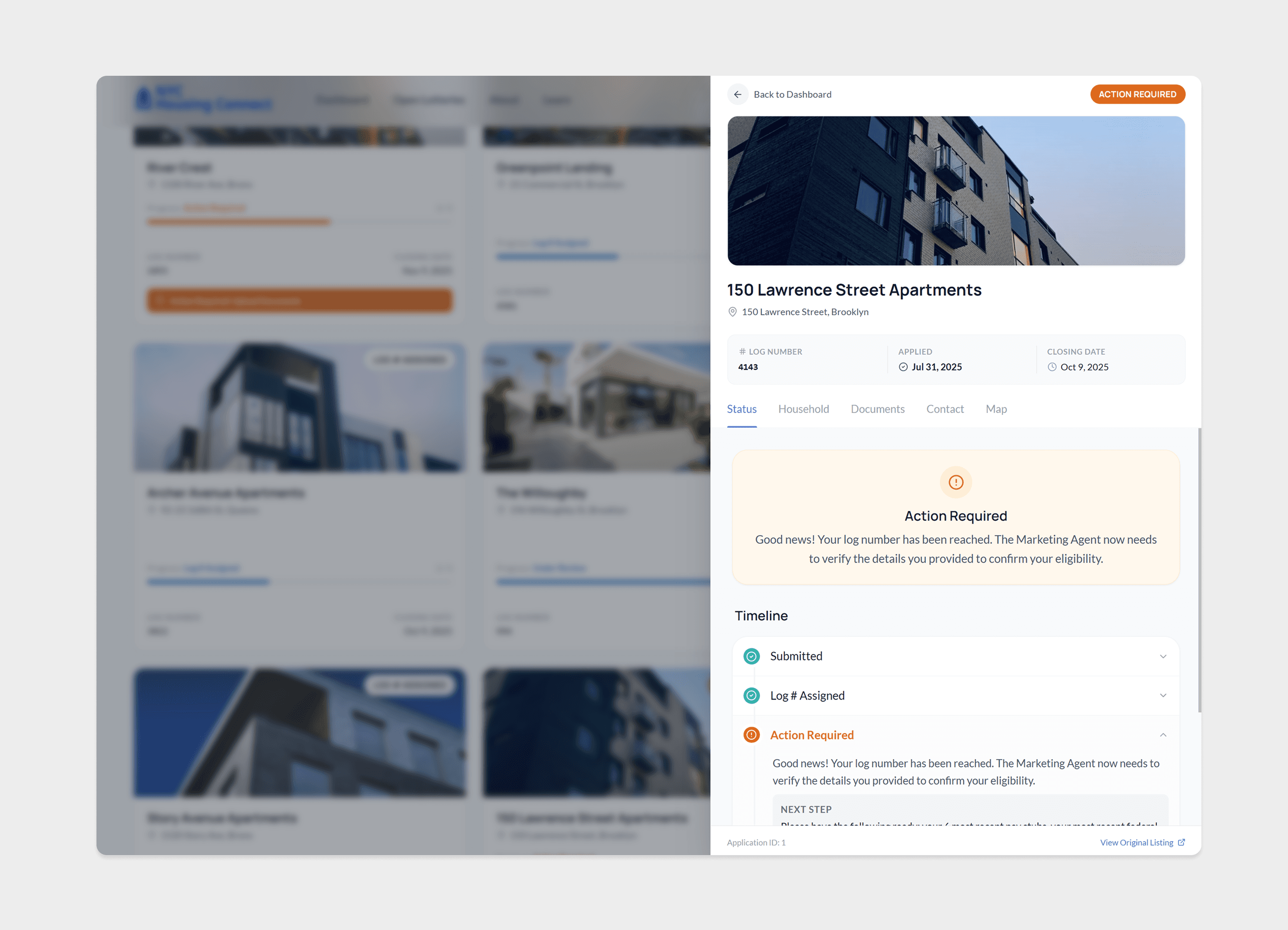
After
Now, users don't lose their place. Clicking a card opens a panel over the list, letting them peek at the details and get back to browsing instantly. Plus, the timeline explicitly shows future steps so they stop asking, "What happens next?"
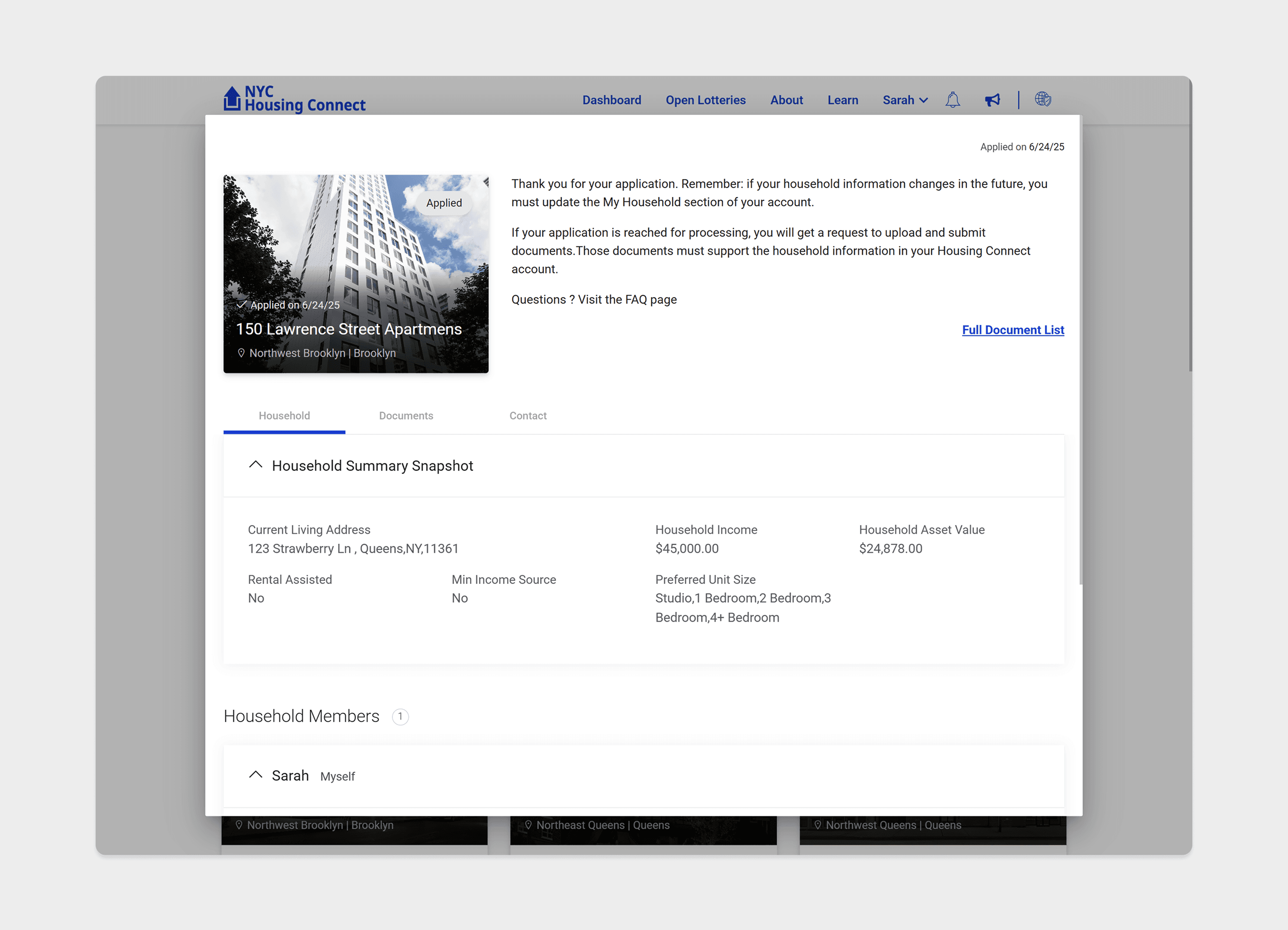
Before
Checking a status is a hassle. It forces you to leave the main dashboard and load a completely new page with confusing tabs. To check 10 applications, you have to bounce back and forth 20 times.
FINAL DESIGNS
Catch up on status, spot urgent deadlines, and dive deep into history without losing your place.
Action-First Workspace
Instead of greeting users with a confusing list, the new dashboard acts like a personal assistant. It immediately tells you: "Here are the 3 things you need to do today," so you don't have to hunt for them.
Visual Progress Tracking
No more guessing. The new cards show a 5-step progress bar right on the front, so users can scan their entire list in seconds and see exactly which applications are moving forward without clicking a single button.
Contextual Sidebar
Checking a status shouldn't mean losing your spot. The sidebar lets users peek at the details while keeping the main list visible. Plus, the timeline explicitly shows what steps are coming next—so they stop wondering if they missed something.
LEARNINGS & IMPACT
Designing for emotion in a system defined by logic.

Measuring Confidence
Success isn't just click-through rates; it's lowering heart rates. By shifting the focus from government compliance to human empathy, this redesign gives users permission to relax, projecting a significant drop in obsessive portal-checking.
Copywriting is UX
The biggest breakthrough wasn't a UI component, but a text change. Rewriting robotic status updates to sound human ("You're all set" vs "Submission Accepted") proved that tone of voice is just as functional as button placement.
Bridging the Digital Divide
Accessibility goes beyond screen readers. If I had more time, I would prioritize SMS notifications to ensure applicants with limited data plans never miss a critical deadline due to a lack of internet access.